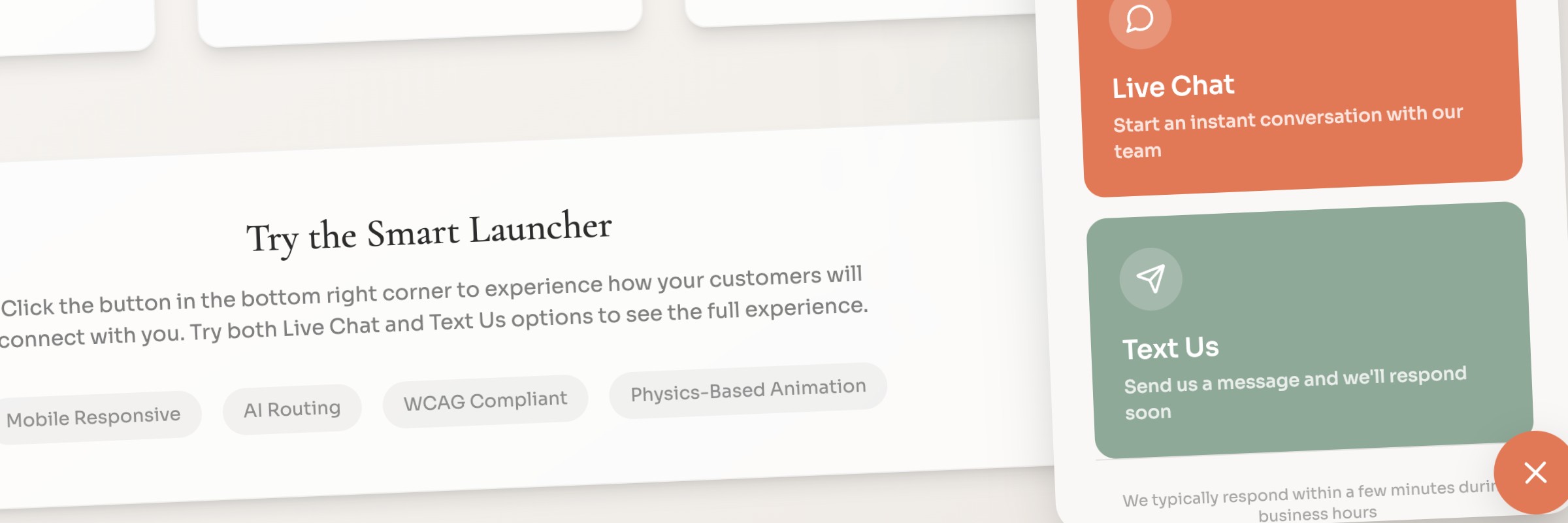
Smart Launcher
Rethinking the front door to every conversation
The Challenge
The existing website widget worked… in the way that a first version of something works. Clients installed a script on their site, website visitors picked an SMS or chat channel, and could send a message. Simple enough on the surface.
The platform was positioning itself as a conversation management tool. The entry point for every website-originated conversation needed to reflect that. It didn’t.
Role
As Product Owner and UX Lead, I initiated the competitive analysis, drove the naming strategy, restructured the admin information architecture, and authored the Capability Briefs for Smart Launcher. I also began designing the new admin tabs in React before the project was shelved. The design files and briefs exist and are referenced throughout this case study.
Un Understand
A Widget in Name Only
The existing widget had one fundamental design flaw… no system model. Everything was coupled to everything else. “Channel” was doing five jobs at once… routing target, UI option, consent anchor, destination, and configuration object. That coupling produced predictable gaps.
There were stories in the backlog to improve it. But the more I looked at it, the clearer it became that incremental improvements weren’t going to get us where we needed to go. This needed to be rethought from the ground up.
Knowing the Competition
Before designing anything, I wanted to understand where we stood. I initiated a competitive analysis across Intercom, LiveChat, and SlickText… mapping features, implementation patterns, and accessibility posture.
The analysis surfaced something useful. The market splits cleanly into chat-first and SMS-first products. Nobody cleanly owns the “website visitor into a real, ongoing, compliant conversation” space. That gap was ours to own… if we were intentional about it.
The 41-Location Problem
We had a real use case that made the routing gap impossible to ignore. A prospective client had 41 locations and a single website. Under the existing system, that would require all 41 locations to have a channel manually configured as an entry point, and the website visitor to select the right one themselves. On top of that, none of it was available through the API.
That’s not a widget problem. That’s a system design problem.
A Compliance Gap I’d Been Watching for Years
I was also well aware that our product had gaps in how it handled consent and compliance. TCPA and TCR guidelines exist for good reasons… and when a website visitor hands over a mobile number, that consent needs to be captured and elevated to the right levels. It wasn’t being done the way it needed to be. The Smart Launcher was an opportunity to fix that properly.
Si Simplify
Naming It Right
“Widget” was the first thing I wanted to fix. Not just cosmetically… the name was shaping how people thought about the product. A widget gets patched. A platform capability gets designed.
I worked through a handful of directions before landing on Smart Launcher. It’s active, it’s simple, and it scales to AI-assisted routing without overselling it. Marketing could get behind it. Engineers could build to it. And it accurately described what the product was becoming… a smart entry point into a conversation management platform.
Restructuring the Admin
The old admin tabs were called Settings, Custom Text, Design, and Installation. Those names reflected how the product was built… not what it actually needed to do.
I restructured the admin around the real system model:
- Availability — where and when the launcher appears
- Experience — what the website visitor sees and does
- Routing — where the conversation goes and how the system decides
- Consent — what communication is permitted
- Branding — how it looks within accessible constraints
- Installation — how it gets deployed
That restructuring wasn’t cosmetic. Each tab represented a distinct layer of the system with its own rules and its own Capability Brief section. The information architecture was the system design made visible.
API-First by Design
The old widget was UI-first… configured manually, not accessible via API. I wanted to design Smart Launcher so that every configuration option could be handled through the API. Not because enterprise clients would set up launchers entirely through the API, but because building it that way meant building it once and building it right. UI-less integrations, webhooks, and APIs are where this platform is heading. Smart Launcher needed to reflect that.
The Availability Rules Engine
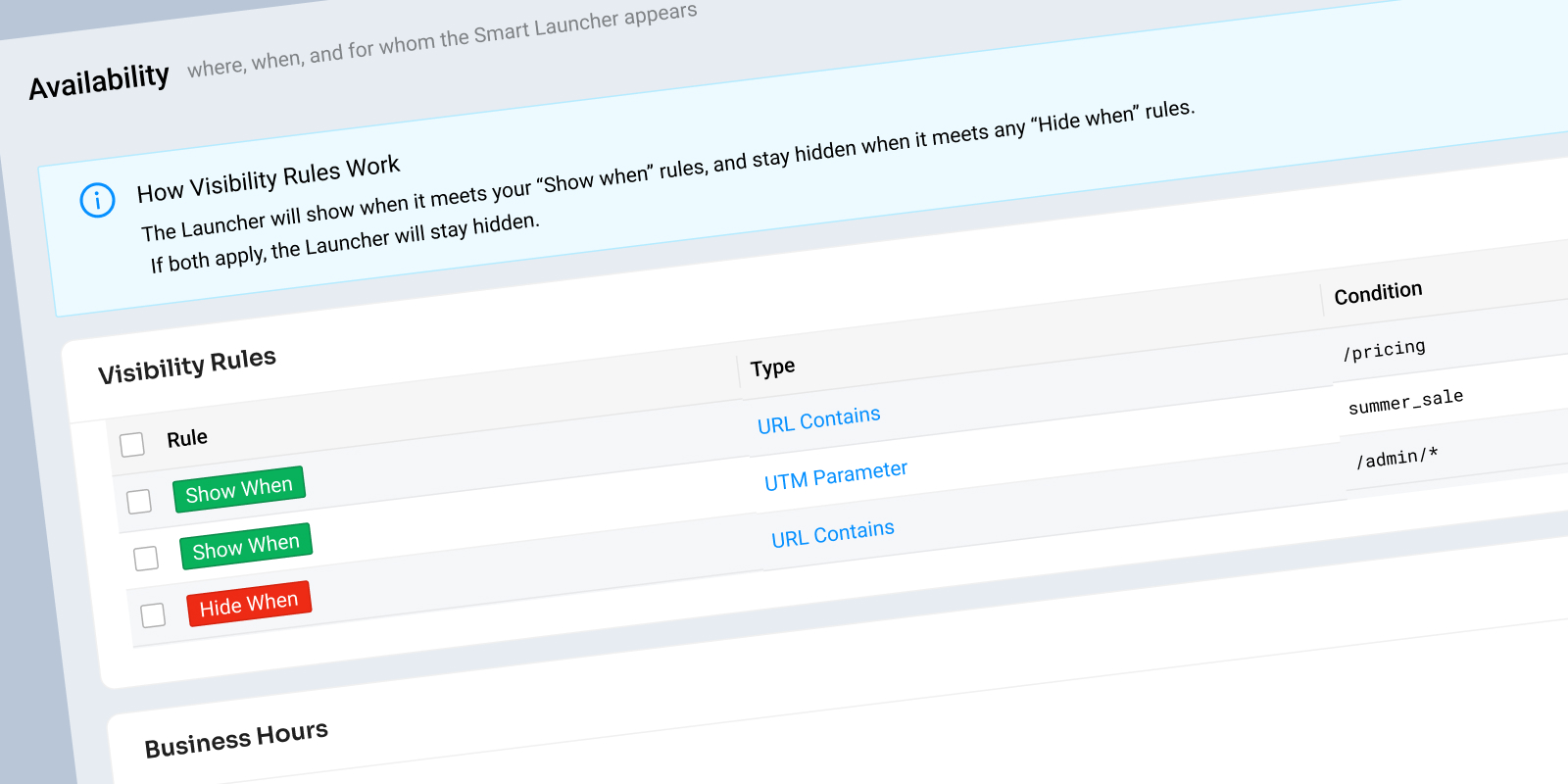
The most complex design problem was the Availability tab, specifically the rules engine that determined when and where the launcher button appeared. The existing system only supported a simple domain whitelist. That wasn’t going to cut it.
I designed a rules engine around two simple concepts: Show when… and Hide when… with conditions based on URL path, UTM parameters, device type, geolocation, and time of day. Simple defaults for the majority of use cases, with an advanced rule builder available for enterprise needs. Hide rules always take priority. And every rule set generates a plain-English summary so admins understand what they’ve configured without re-reading every condition.
I fully intended to reuse the core logic from the Availability rules engine for the Routing rules engine… build it once, apply it in multiple places.
Al Align
Conversations with the Product, Not Just About It
A lot of the thinking behind Smart Launcher was developed iteratively, working through edge cases, naming decisions, and system design in real time with AI. The Capability Briefs, the tab restructure, the naming, the token system… all of it was pressure-tested through that process before a single design decision was finalized.
That approach meant that by the time designs were started, the system model was already solid. The designs were translating decisions that had already been made… not making new ones on the fly.
AI-Assisted Routing
Routing was never going to be a one-way decision. I wanted AI to route confidently when it could… suggest a destination when it wasn’t sure… and fall back to user selection when confidence was low. And if an agent felt a message was routed incorrectly, they could kick it back. The system would learn from those corrections over time.
That’s a fundamentally different model than a dropdown. It reduces friction for the website visitor, reduces setup burden for the admin, and gets smarter the more it’s used.
Va Validate
Where It Stands
The Capability Briefs were started. Several admin tabs were designed, the Availability rules engine being the most developed. The project was shelved before it crossed the finish line.
But the thinking is documented. The designs exist. And the problems it was solving… manual routing, compliance gaps, API limitations, enterprise scale… haven’t gone away.
Smart Launcher was designed to be a front door to conversations. That’s still true whenever someone decides to open it.